
Documentation
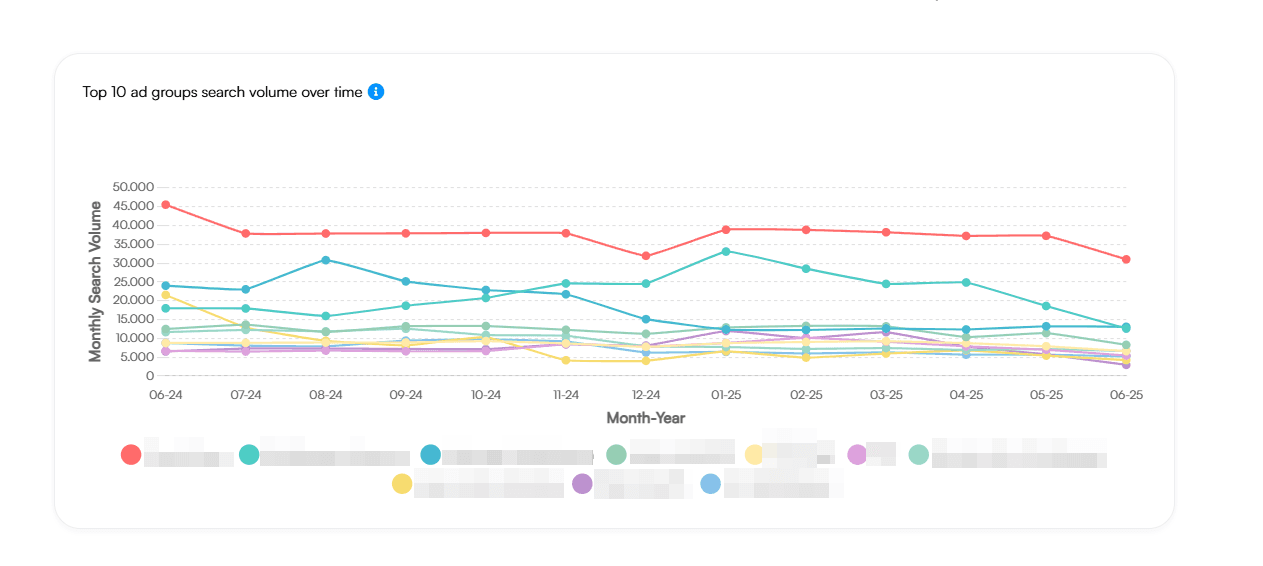
Market Data enriches the search terms from your Google Ads campaigns with Google Keyword Planner monthly search volumes, giving you a demand layer alongside your performance data. Instead of only seeing that impressions or conversions changed, you can check whether the market itself grew, shrank, or followed a seasonal pattern. You can review this demand context at account, campaign, ad group, and individual search-term level, making it easier to separate market-driven changes from account-driven ones.
- Primary signal
- Google Keyword Planner monthly search volume
- Source terms
- Google Ads search terms with substantial volume
- Refresh rhythm
- Monthly
- Trend history
- 12 months of search volume per term
- Pivot levels
- Account, campaign, ad group, and search term
#What Market Data does
Market Data is Adnine's Monthly Search Volumes report. Every month it processes all search terms from your campaigns that have meaningful volume, then enriches them with Keyword Planner data provided directly by Google. The result is a demand layer that sits beside your standard Google Ads performance metrics.
Monthly search volume is one of the best available proxies for consumer demand. With it you can identify trends at search-term, ad group, campaign, and account level. A mattress retailer, for example, might notice rising volume for temperature-regulating mattresses months before that trend shows up strongly in Google Ads performance alone, and adjust product strategy, landing pages, or keyword coverage accordingly.
#Who should use it and when
Market Data is most useful when you need to explain a performance change and are not sure whether the cause sits in your account or in the broader market. It is equally helpful for forward-looking planning: spotting seasonal peaks before they arrive, identifying growing demand for new product themes, or setting realistic expectations when a market is contracting.
Common situations where Market Data helps
Explaining a performance drop
Impressions and conversions are down, but impression share is stable. Market Data can confirm whether the underlying market shrank, which is a common cause in seasonal categories.
Planning seasonal budgets
Use the 12-month history to see when demand peaks and dips for your product themes, then adjust budget and bid strategy before the market moves.
Spotting emerging demand
Rising volume on specific search terms can signal product trends or new customer intent before that traffic is large enough to move Google Ads metrics clearly.
Validating keyword coverage
High-volume terms that appear in your search-term data but receive low coverage may warrant dedicated keywords, match-type review, or new ad group structure.
#How Market Data works
- Search terms are collected from your campaigns Adnine pulls search-term data from all Google Ads campaigns connected to your account. Terms with substantial search volume are selected for enrichment.
- Each term is enriched with Keyword Planner data Google Keyword Planner provides monthly search volume estimates for each term. This data comes directly from Google and is refreshed monthly.
- Volume is aggregated up the account hierarchy Enriched term-level volume is rolled up to ad group, campaign, and account level so you can see aggregated demand at whichever level you need to work.
- 12 months of history is maintained per term The report stores one month-by-month volume history for each term, giving you a full year of context for trend and seasonality analysis.
- You filter, pivot, and drill down as needed Use account and campaign filters to focus the charts and table on the business area you are investigating. Pivot between levels to move from broad signals to specific search terms.
#Data and metrics in the report
The report has three main views: aggregated charts that show total volume rolled up by your chosen level, a comprehensive data table that lets you browse and sort all enriched search terms, and a time-series history for spotting patterns across the 12-month window.
Core data fields
These are the primary fields in the Market Data report. Use them together rather than reading any single field in isolation.
| Field | What it shows | How to use it |
|---|---|---|
| Search term | The query or query theme observed from your Google Ads search-term data. | Inspect the exact demand pattern behind an ad group or campaign. |
| Monthly search volume | Keyword Planner's estimate of how often people search for this term in a given month. | Use as a proxy for current consumer demand and market size. |
| 12-month volume history | Month-by-month search volume for the past year. | Identify seasonality, sustained growth, decline, and demand cycles. |
| Aggregated volume | Search volume summed across all terms in a selected campaign or ad group. | Compare overall demand across business areas without reviewing every term individually. |
| Account / campaign / ad group | The Google Ads structure where the search term appeared. | Connect market demand directly to the structure where budget and targeting decisions happen. |
Pivot levels and what each answers
| Pivot level | Best question to answer | Watch out for |
|---|---|---|
| Account | Is overall demand for my business rising, falling, or stable? | Account totals can hide opposing trends in different product lines or geographies. |
| Campaign | Which areas of my account are experiencing market growth or contraction? | High total volume for a campaign can still contain clusters of weak or irrelevant terms. |
| Ad group | Which themes within a campaign are growing, seasonal, or shrinking? | Ad group averages can blend profitable and low-quality search terms. |
| Search term | What is the exact demand trend behind a specific query? | Keyword Planner volumes are estimates: directional and sometimes rounded or grouped. |
| Month | How does last month compare to the prior months in the year? | Read month-over-month changes together with campaign history and known seasonality. |
#How to read market signals
The most valuable thing Market Data does is separate market-driven from account-driven performance changes. Before concluding that a campaign has a problem or an opportunity, check what the underlying search volume is doing. The table below covers the most common patterns.
Common trend patterns and next steps
| Pattern | Most likely reading | What to check next |
|---|---|---|
| Volume down, impression share stable, performance down | The market softened while your relative coverage held steady. | Review seasonality and prior-year volume. Consider whether budget should be reduced to match lower opportunity. |
| Volume up, account impressions flat | Demand is growing but your account may not be capturing the extra traffic. | Check impression share, budget delivery, keyword coverage, match types, and campaign eligibility. |
| Volume up, conversions up, efficiency stable | The campaign is benefiting from real market expansion. | Consider increasing budget, expanding related keywords, or protecting strong search-term coverage. |
| Volume up, clicks up, efficiency worse | The broader market is larger, but extra traffic may be less qualified. | Pivot into ad groups and search terms to find where demand is useful versus where it is noisy. |
| Volume flat, conversions down | Market demand alone does not explain the performance drop. | Investigate tracking, landing pages, auction pressure, search-term mix, bids, budgets, and recent account changes. |
| Volume flat, all metrics flat | No obvious market signal; the status quo is holding. | Use other reports for efficiency and quality reviews. No immediate market-driven action needed. |
#Recommended workflow
Work through Market Data in a consistent order to avoid over-reacting to single data points. Starting broad and drilling down keeps the analysis grounded and the actions specific.
- Set your scope Choose the account, campaign, or product area you want to investigate. Narrowing scope early keeps the charts and table readable.
- Read the 12-month trend first Before judging recent Google Ads performance, check whether search volume is rising, falling, flat, or following a seasonal cycle. This is the market baseline that gives all other metrics context.
- Compare volume with account metrics Place search volume beside impressions, clicks, conversions, impression share, CPA, ROAS, and budget delivery. Look for divergence. That is where the interesting questions live.
- Pivot into ad groups and search terms Use the data table to move from totals into the specific themes and queries driving the trend. A campaign-level rise or fall often comes from just a few ad groups or terms.
- Decide and act Increase focus on growing profitable demand, prepare seasonal budget shifts, investigate missed capture opportunities, or reduce attention on themes where market demand is clearly contracting.
- Revisit next month Market Data refreshes monthly. Use the next update to confirm whether the trend continued and whether your account response changed capture or efficiency as expected.
#Limits and data quality
Market Data is a planning and diagnosis layer, not a real-time performance feed. Understanding what it cannot do is as important as knowing what it can.
Known limitations
| Limitation | Why it matters | How to handle it |
|---|---|---|
| Monthly refresh only | The report is built around monthly estimates, not intraday or weekly data. | Use it for trend and planning decisions. Use Google Ads performance views for day-to-day pacing. |
| Keyword Planner estimates are directional | Volume values can be rounded, grouped into buckets, or unavailable for some queries. | Look for meaningful patterns across multiple terms and months rather than reacting to small differences in a single number. |
| Substantial-volume terms only | Very low-volume, private, or unavailable queries may not appear or may have no reliable volume data. | Combine Market Data with Search Term Insights when reviewing long-tail query coverage. |
| Volume does not equal profitability | A large market can still be unprofitable if CPA, ROAS, conversion rate, or margin is weak. | Confirm commercial economics before acting on a volume signal. |
| No competitor-pressure metric | Market Data describes demand, not auction crowding, competitor impression share, or bid pressure. | Use Competitive Analysis or Auction Insights reports for competitor-focused questions. |
#Troubleshooting and common questions
Frequently asked questions
Why is a search term I can see in Google Ads missing from Market Data?
How current is the search volume data?
Why does aggregated volume at campaign level not match the sum of all individual term volumes?
Can I use Market Data to benchmark against competitors?
My conversions and clicks are up but the search volume is flat. What does that mean?
How far back does the 12-month history go?
#Best practices
Follow these practices to get consistent, reliable value from Market Data each month.
- Before diagnosing a performance drop as an account problem, check whether the underlying search volume dropped first.
- Compare search volume with impression share to separate lower market demand from lower account capture.
- Review the 12-month history before planning or adjusting budgets in seasonal product categories.
- Start at campaign or account level to find the biggest signals, then drill into ad groups and search terms before acting.
- Treat high-volume terms as opportunities only when CPA, ROAS, conversion rate, and margin support the investment.
- Use rising-volume terms as inputs for keyword additions, landing-page planning, product strategy, or campaign expansion.
- Use falling-volume terms to adjust forecasts, set realistic expectations with stakeholders, and avoid forcing spend into shrinking demand.
- Document whether a performance change was market-driven, account-driven, or still unexplained before making a recommendation.